
Streamline (Data Management Solutions) is pleased to announce this week’s enhancements and fixes to our application. Each enhancement and fix has been grouped by Solution Area (Data and/or Ben Ops) for easier identification and review.
New + Improved
Data Solution Area
Added Verifier Dates to Comparison Export
We have added two new columns to the Comparison Export to provide additional visibility into audit workflow timelines:
1. Verifier Assignment Date
2. Verifier Completion Date
These additions allow users to better track when an audit was assigned to a verifier and when the verifier completed the audit review process.
Added Copy Functionality for Discrepancy Types and Notes
We have added enhanced functionality to the verification steps that allows users to copy discrepancy types, auditor notes, and verifier notes across records with the same data point.
This enhancement helps reduce repetitive manual entry by allowing users to quickly apply the same discrepancy classifications and notes when the same explanation applies to multiple records tied to the same data point. The functionality appears as a button and will only display when a data point has more than one occurrence within the audit.
This update improves audit workflow efficiency, increases consistency across discrepancies, and reduces the need for repeated note entry during both auditor and verifier review steps.
In addition to the ability to copy discrepancy types and notes, we have also added functionality that automatically moves worked discrepancies to the end of the list. This allows unworked discrepancies to display first, helping users more easily identify outstanding items and improving overall workflow efficiency during the audit review process.
Audit Tasks Reclassified to Data Solution Area
Audit Tasks have been reclassified from the Ben Ops solution area to the Data solution area and will now display the appropriate Data solution icon throughout Streamline. This update better aligns Audit Tasks with their core data validation and auditing functionality.
As part of this enhancement, users with the Data only subscription plan now have the ability to create and manage Audit Tasks directly within Streamline.
As a reminder, Audit Tasks can be created and assigned to a user of your choice to support collaboration and task tracking. When an Audit Task is created, Streamline will also automatically generate the associated audit, helping streamline the audit setup process and reduce manual steps
Ben Ops Solution Area
Client Implementation Wizard
We have introduced a new Client Implementation Wizard designed to help streamline the collection, organization, and setup of information needed to build a new group within a benefit administration system.
The wizard follows a structured workflow similar to the Renewal Wizard, combining Client-entered information with General Agent review and collaboration throughout the implementation process.
The implementation process begins by capturing core company information such as:
-
-
- Address information
- Tax ID
- Benefit Eligible Lives
- Company contacts
-
The wizard then guides users through collecting the client’s organizational structure, including payroll groups, classes, and all associated eligibility and entry rules tied to those classes.
Additional organizational structure information can also be captured, including:
-
-
- Offices
- Divisions
- Departments
- Business Units
- Other location-based details needed for implementation setup
-
Once the core client structure information has been completed, users can then move into collecting and reviewing plan information as part of the implementation process, including but not limited to carrier, plan names, documents, rates, rounding rules, contributions, limits, and eligibility details.
Agency and Organization Admin users have the ability to initiate a Client Implementation in two ways:
-
-
- During Company creation in Streamline by selecting the Kickoff Implementation Task checkbox
- After the Company has already been created by selecting New within the Implementation Tasks section on the Company Home Page
-
If initiated by an Organization Admin, the Client Implementation will automatically be assigned to the default support email designated at the Agency level and can then be reassigned as needed.
Just like the Renewal Wizard, the ability to disable system-generated email notifications has also been added to the Client Implementation process. This provides additional flexibility for agencies and users who may not require automated collaboration emails throughout the implementation lifecycle.
A new Client Implementation report is also available at both the Agency and Organization levels under the Reports section called Implementations.
In addition to serving as an implementation intake and collaboration tool, the Client Implementation Wizard also automatically creates and configures much of the information entered directly within Streamline. This helps reduce duplicate data entry, improve setup efficiency, and ensure the client structure and related information are already established within the software as part of the implementation process.
Can now reopen Closed Tasks
Agency Users now have the ability to reopen closed Eligibility Management, Support, and Audit Tasks.
Previously, once a task was closed, the action was permanent and could not be reversed. This created challenges in situations where a task was accidentally closed, closed prematurely, or needed to be resumed due to additional work, follow-up, or updated information.
With this enhancement, Agency Users can now reopen eligible closed tasks instead of creating a brand-new task, helping preserve task history, comments, attachments, and audit tracking associated with the original request. This enhancement improves workflow flexibility while reducing duplicate task creation and maintaining better visibility into ongoing work items.
Additionally, we have also updated the task closure email notifications. Automatic email notifications will now be sent to both the task owner and assignee whenever a task is closed, regardless of whether a comment was added during the close process. Previously, closure notifications were only sent when a comment was included at the time the task was closed.
Enhanced Renewal Wizard Functionality
We have added enhanced functionality and an updated view to the Plans Checklist step within the Renewal Wizard. Additional guidance has also been added to help outline the steps needed to complete this section.
Users can now add a new plan directly within the Renewal Wizard without needing to navigate outside of the renewal. The Add a Plan functionality captures only the minimum required information needed to create the plan, including:
-
-
- Carrier
- Renewal Month
- Plan Name
- Benefit Type
-
All additional plan details will still need to be completed within the Carrier Detail page. The Renewal Month will automatically populate based on the Renewal Month selected during the renewal creation process.
Additionally, a new Plans Documents section has been added to the main Plans Checklist step, allowing users to upload documents that apply to multiple plans instead of uploading the same document under multiple individual plans. Uploading files directly to specific plans will continue to function as it does today.
Additional Task and Issue Types
To provide additional tracking and workflow flexibility, we have added new task types to the Support Tasks module:
-
-
- Post Renewal
- Import Issue
- Renewal Notes
- Post Implementation
- Implementation Notes
-
These new task types allow users to better categorize and manage support-related activities associated with renewals, implementations, imports, and ongoing client follow-up items.
The new Renewal and Implementation Notes task types were specifically added to provide an alternate location for tracking renewal and implementation-related information, particularly for details associated with renewal/implementation steps that have already been closed and can no longer be updated directly within the Wizards.
In addition, we have added a new Issue Type called Carrier/Key Manual Eligibility to the Eligibility Management Tasks module to support expanded issue tracking and improve visibility into eligibility-related items requiring review or resolution.
Added Changes Source Type Field to Eligibility Management Tasks
We have added a new “Changes Source Type” dropdown field to the Eligibility Management Task for both Recurring and Open Enrollment processing types. This enhancement allows users to better track and document how enrollment changes were received throughout the processing workflow.
Available Changes Source Type options include:
-
-
- Wall Notification
- Changes Report
- XML Report
- Email Request
- Paper Form
- Other
-
This addition provides improved visibility, reporting consistency, and tracking of enrollment change sources within Streamline’s Eligibility Management workflow.
Disable Emails for Renewals and Client Implementations
We have added the ability to disable system-generated email notifications for Renewals and Client Implementations. This enhancement provides additional flexibility for agencies and users who may not require automated collaboration emails throughout the process.
This functionality is especially beneficial in scenarios where a single user is handling the entire Renewal or Client Implementation from start to finish and ongoing email notifications are unnecessary. Disabling emails can help reduce inbox clutter while still maintaining full access to workflow tracking, comments, and status updates directly within Streamline.
When the Disable Emails option is enabled, system-generated notifications for that specific Renewal or Client Implementation will no longer be sent.
The Disable Emails option is available only during the initial creation step of the Renewal or Client Implementation process. Once selected, the setting will remain in place for the entire lifecycle of that specific process and cannot be reversed or re-enabled later.
New Carriers and Benefit Types added
As part of our continued efforts to expand and enhance Streamline’s carrier and benefit type library, we have added the following new carriers and benefit types to the platform.
New Carriers Added:
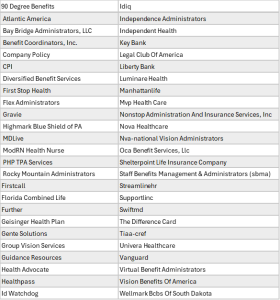
New Benefit Types Added:
-
-
- Company Perks
- Pediatric Dental
-
These additions help improve platform flexibility, support additional implementation scenarios, and reduce the need for custom carrier or benefit type setup requests.
New Ben Admin Systems added
We are excited to announce that a new Benefit Administration System, Zevo, has been added to the list of supported systems within Streamline. This enhancement expands integration capabilities and provides additional flexibility for agencies and organizations managing benefits administration processes through the platform.
Carrier and Carrier Plans Import now offers mapping on the Managed Eligibility Type
We have enhanced the Carrier and Carrier Plans import functionality to support mapping Employee Navigator Processing Types from the Employee Navigator Company Plans Report directly to Streamline’s Eligibility Management Type fields located on both the Carrier Detail and Plan Detail pages.
Additionally, the Carrier Plans import now supports automatic Renewal Month extraction from dates entered in a Month/Day/Year format. When a valid date is provided, Streamline will automatically identify and save the corresponding month as the Renewal Month within the platform.
This enhancement helps streamline configuration setup and reduce the need for manual updates prior to import.
Updated Renewal Menu Navigation
We have updated the placement of the Renewal Planning and Renewal menu items within the left-hand navigation menu. Renewal Planning will now appear before Renewals to better align with the typical renewal workflow process.
This change was made to improve usability and navigation flow, as users generally review upcoming renewals and planning activities first before initiating or managing active renewals from the Renewals list.
Carrier & Plans Export Enhancements.
We have enhanced the Carrier & Plans export functionality by adding the Notes field to both the combined Carrier & Plans export file and the individual Carrier and Plan export files.
This update provides users with additional visibility into carrier- and plan-specific details directly within the exported data, reducing the need to reference Streamline separately when reviewing or sharing export information.
Ben Ops and Data
Enhanced Comment Visibility
We have enhanced the Comments section by applying color formatting to the comment author and timestamp fields to provide clearer visual separation between comments.
This improvement makes it easier for users to quickly identify individual comment entries, distinguish between contributors, and review comment history more efficiently within Streamline.
Added Ability to Resend Registration Emails
We have added the ability for Agency Admins and Organization Admins to resend registration emails for users directly within the platform.
This enhancement helps streamline user onboarding and access management by allowing admins to quickly resend registration emails in situations where the original email was not received, expired, deleted, or needs to be sent again for completion of the registration process.
Updated Task Owner Language
We have updated the terminology throughout Streamline from “Task Owner” to “Task Creator” to provide clearer distinction between the user who created the task and the user responsible for completing it.
This enhancement helps clarify task responsibilities by indicating that the Task Creator is the user who created and assigned the task, while the Assignee is the individual responsible for completing and managing the task workflow.
Agency Consolidated Report
In an effort to provide additional reporting visibility and simplify reporting across modules, we have added a new consolidated report called ALL TASKS.
This report combines information from the following modules into a single exportable report:
-
-
- Eligibility Management Tasks
- Support Tasks
- Audit Tasks
- Renewal Wizards
- Client Implementation Wizards
-
While the consolidated report does not contain every field available within the individual module reports, it includes all common fields shared across these processes. This allows users to more easily review, track, filter, and report on activity across multiple workflow areas from a single report instead of pulling multiple separate exports.
Fixes:
Ben Ops Solutions Area
Benefit Mapping during Import
We have corrected an issue within the benefit mapping process that could cause the Carrier Plans import to fail due to incorrect mapping assignments. This enhancement improves import reliability and ensures carrier plans are processed successfully when mappings are configured.
Additionally, we have expanded the available mappings between Employee Navigator categories and Streamline Benefit Types to improve compatibility and reduce the need for manual benefit type adjustments during the import process.
_________________________________
Reminder: Carrier, Carrier Plans, and Associated modules Availability
Please note that Carriers and Carrier Plans as well as the Client Implementation, Renewal, and most Tracking Modules are only available to organizations on Streamline BenOps.
If you’re interested in upgrading your current subscription, please contact our Business Development Team at sales@brokerbuildersolutions.com.
_____________________________________
Coming Soon!
Upcoming enhancements to Streamline:
1. EDI Implementation Wizard
2. User Import Functionality
3. File Renewal Task
4. Dashboards
Reminders
- All support Inquiries should be directed to support@dms-datavalidate.com
- Competing priorities making auditing an issue, please remember we offer our Audits on Demands and Subscription Based Audit services, allowing the Data Management Team to manage your audit workflow.
For more information, please visit our website at AOD and SBA Packages | DMS Data Validate (streamlinebydms.com) or contact sales@brokerbuildersolutions.com
- If you have changed the plan names or carriers in your Ben Admin or Payroll system, this may impact your existing mapping structure.
Have an idea or enhancement that you'd like to see added to our application?
Submit your request via our online Enhancement Request Form